
Cards & Transactions
One tap, canteen and attendance done
A standalone device for the canteen counter or the school gate, with no phone and no till computer
Not every canteen has a phone or tablet for a cashier app, and not every gate has a computer for attendance. CazhTap is a small self-contained device: the seller keys in the amount and the student taps their card, or the student simply taps on arrival to be marked present. The result is recorded in CARDS straight away and visible to parents.
- Takes student cards, RFID wristbands, card QR codes, and QRIS
- One device for the canteen or for attendance
- Linked once, then ready to use every day
What you get
Even a small canteen can go cashless
The seller just keys in the amount and presses OK. There is no app to install, no product list to maintain, and no dedicated phone needed to start selling.
Break-time queues clear quickly
The student taps their card or wristband, the screen confirms the payment along with the remaining balance, and a sound signals success. A sale is done in seconds.
Attendance without a computer at the gate
A device set up for attendance records the arrival the moment a student taps, and it feeds the same attendance summary parents see.
Still serves buyers without a card
Teachers, guests, or parents who do not carry a student card can pay by scanning the QRIS code shown on the device.
In the app
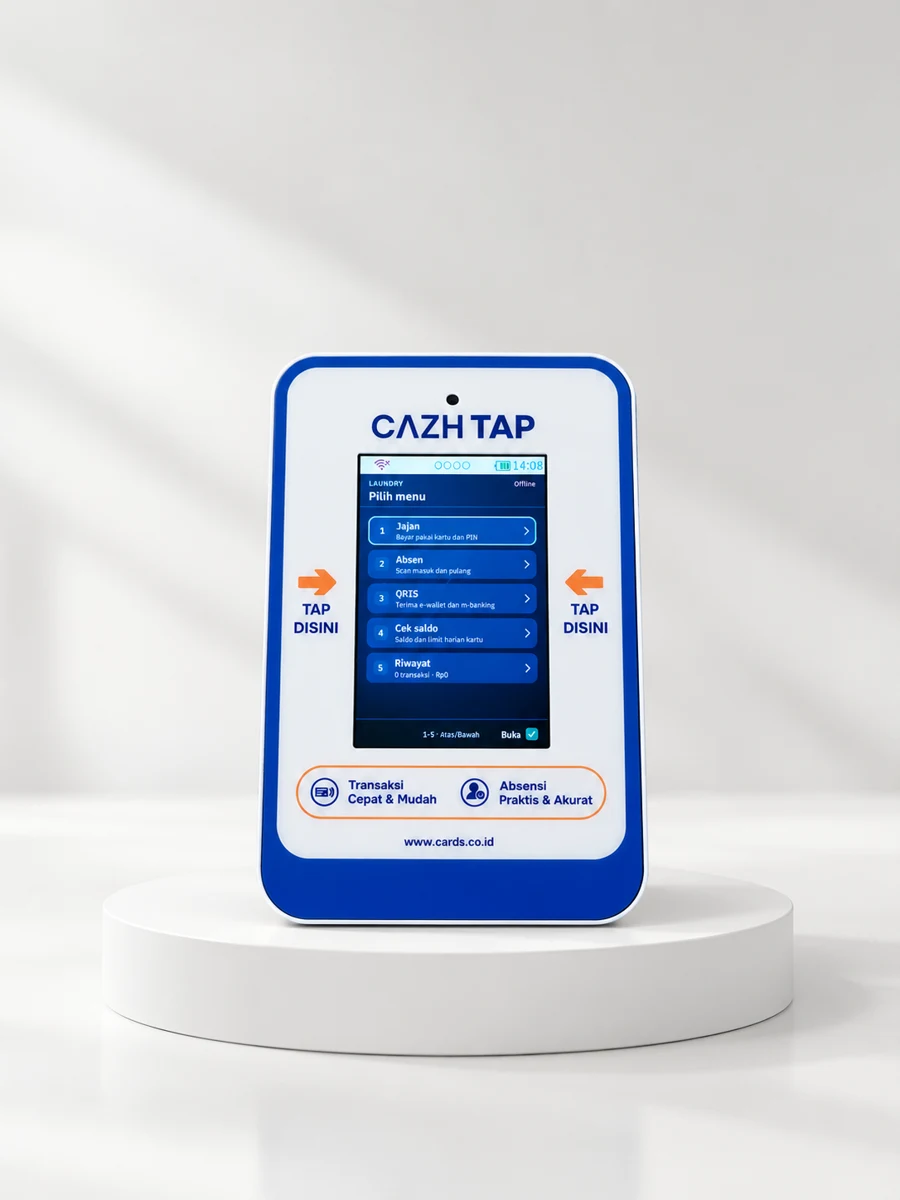
The CazhTap device
A screen, a number pad, and a card reader in one unit that simply sits on the counter.
The CazhTap device
The seller keys in the amount, the student taps their card or wristband
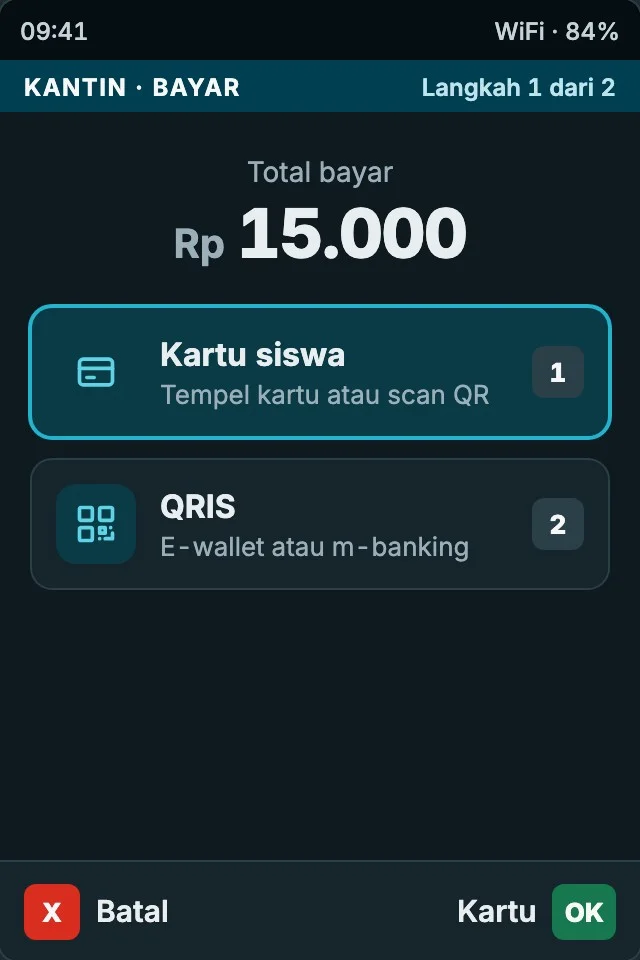
Choose how to pay
Student card or QRIS, picked with the number keys
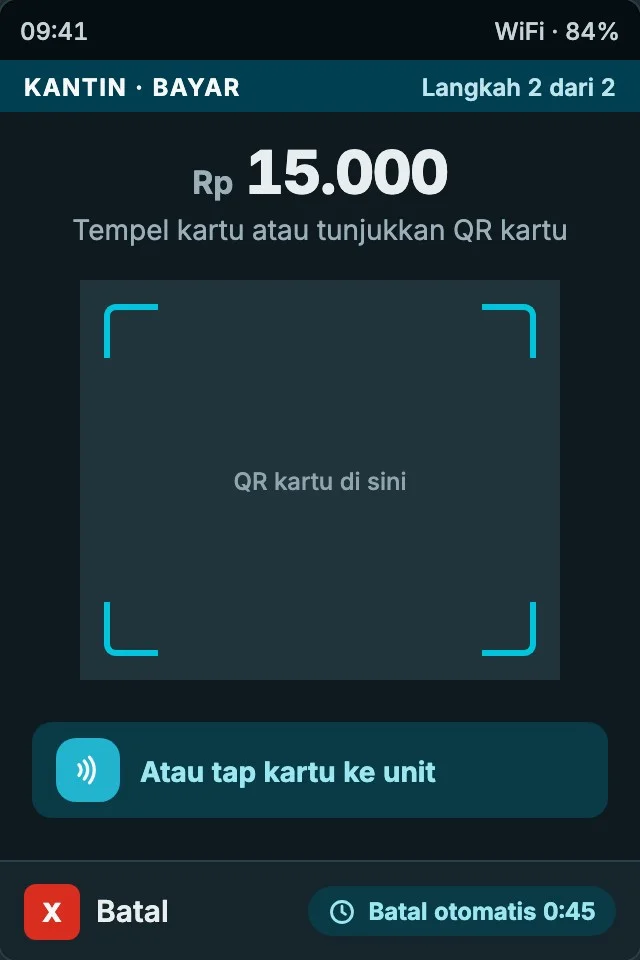
Tap the card
The card is tapped or its QR code is shown to the camera
How it works
How CazhTap works
- Link the deviceScan a code from CazhPOS or the school dashboard; it only needs doing once.
- Key in the amountThe seller presses OK to start, keys in the purchase amount, then presses OK again.
- The student tapsThe card or wristband is tapped, or the card's QR code is shown to the device camera.
- Payment acceptedThe screen confirms the payment along with the remaining balance, and the sale is recorded.
FAQ
Questions about CazhTap
- How is CazhTap different from the CazhPOS cashier app?
- CazhPOS is a full cashier app with products, stock, and sales reports. CazhTap is a simpler device: the seller only keys in an amount and the student taps. Both draw on the same card balance, and a canteen CazhTap is linked through CazhPOS.
- Can one device handle both the canteen and attendance?
- One device runs one role, canteen or attendance. A school that needs both sets up a separate device at each point.
- How is it set up?
- The device is linked once by scanning a code from CazhPOS for the canteen, or from the school dashboard for attendance. After that it is ready to use, powered over a USB-C cable.
- Do students need to enter a PIN when paying?
- When a transaction asks for a PIN, the student types it on the device's number pad. The daily limit set by parents still applies to card transactions.
Related features
More modules in Cards & Transactions
- Digital Student CardOne card for identity, attendance, and cashless spending — with parents fully in control.Learn more
- Card Top-UpAdd funds through retail chains, bank transfer, or the school counter — all in one history.Learn more
- Limits & Parental ControlsDaily limits, product restrictions, access management, PIN changes and resets, and card blocking from the app.Learn more
See CazhTap working at your school
Free demo with our team — or start a trial and set up your own data.