
Student Affairs
A home time that runs in order, not in a crush at the gate
The collector is recorded, students are called in turn, and every pickup has a history
Home time is the busiest moment of the school day: collectors crowd the gate, the duty teacher calls names one by one, and nothing records who collected whom. The Pickup module turns it into a queue. Staff record the collector, the system calls the student over the speaker, and every handover is logged.
- A numbered queue with a clear status at every stage
- Automatic voice call-outs, with a repeat call when needed
- A pickup history you can search and export to Excel
What you get
The gate stops being a bottleneck
Collectors join a numbered queue and students are called in turn, so there is no crowd competing to shout a child's name.
No more shouting for the duty teacher
Call-outs run automatically over the speaker with an adjustable pause between them. If a student has not arrived, one tap repeats the call.
Clear who is collecting
The collector's name and their relationship to the student are recorded on every request, so the school knows who each child was handed to.
A trail when you need one
Pickup history can be filtered by date, searched by student, and exported to Excel whenever the school needs to trace a single event.
In the app
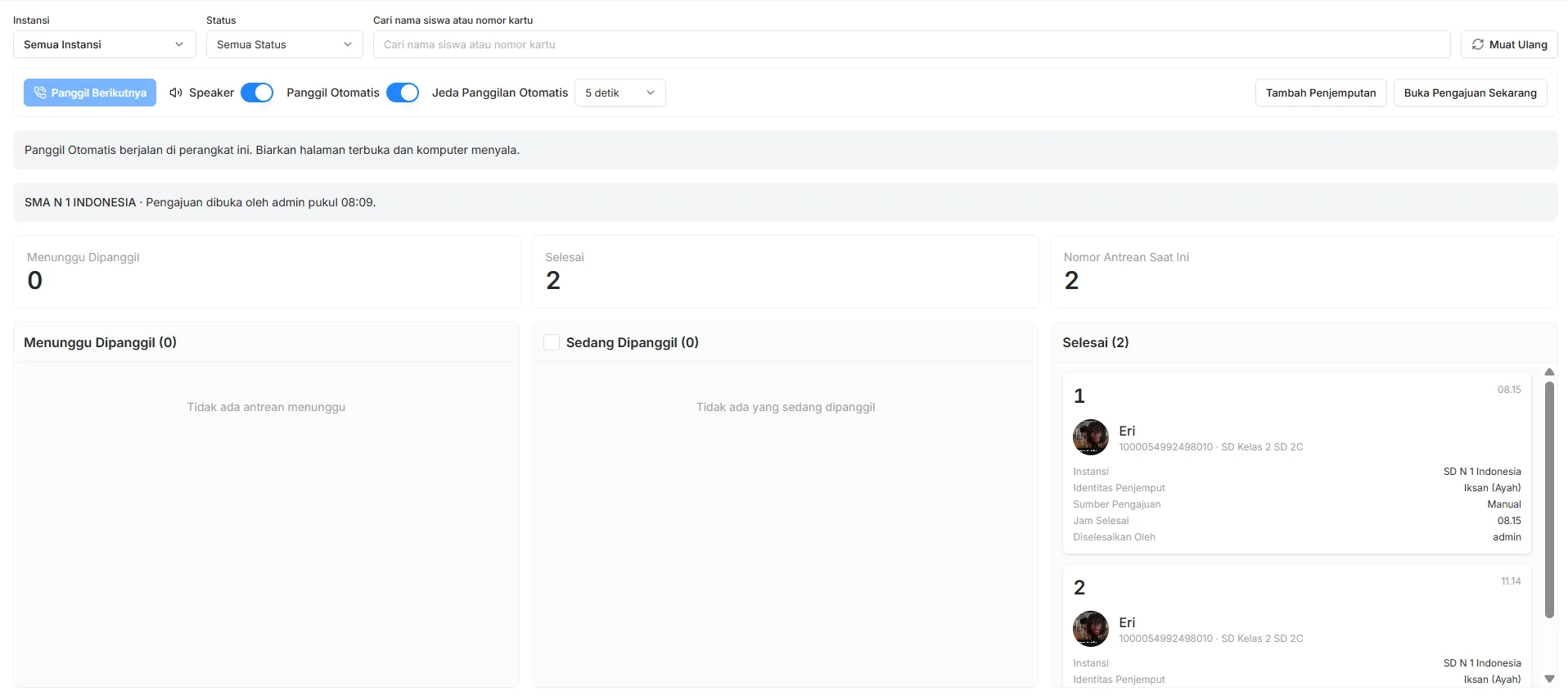
The pickup queue on one screen
Waiting to be called, being called, and done sit side by side.
Pickup List
Automatic calling, the speaker, and the pause between calls are set here
How it works
From request to the student going home
One page in the CARDS School dashboard runs the whole pickup queue.
- Record the collectorStaff pick a student who has been marked present that day, then enter the collector's name and relationship.
- Join the queueThe request receives a queue number and waits to be called.
- The student is calledThe system calls students over the speaker in turn, with a repeat call when needed.
- Done and recordedOnce the student is handed over, staff mark it complete and the pickup moves into the history.
FAQ
Questions about Student Pickup
- What equipment is needed?
- A computer or laptop with the Pickup page open and a working speaker. Automatic call-outs run on that device, so the page needs to stay open throughout home time.
- Who submits a pickup request?
- Requests are recorded by school staff in the CARDS School dashboard, by choosing the student and entering the collector's name and relationship.
- Can an absent student be called?
- No. A pickup can only be requested for a student who has daily attendance recorded that day, so the queue only holds students who are actually at school.
- Does it work for a foundation with several units?
- Yes. The queue is filtered by institution, so each unit runs its own pickup from the same account.
Related features
More modules in Student Affairs
- Achievements & ConductRecord student achievements, conduct breaches, and pastoral progress, open to parents.Learn more
- Leave & VisitsStudent leave requests and guardian visits, complete with their approvals.Learn more
- Health & BullyingRecord student health conditions and provide a bullying reporting channel that gets acted on.Learn more
See Student Pickup working at your school
Free demo with our team — or start a trial and set up your own data.